Why can't I copy text from a PDF?
Have you ever opened a PDF, found the sentence you needed, dragged your mouse across it, pressed Ctrl+C and then realized nothing happened at all?
I have. It is one of those PDF issues that can take up a lot of time without warning. The document looks normal. I can read every word on the screen. I can't select, copy or paste anything. how to edit text in a PDF
The good news is that this problem usually has a reason. A PDF might have text or it might have a scanned image or it might have security settings or the text layer might be broken. Once I know what the issue is, the fix becomes much simpler.
In this guide I will explain why I can't copy text from a PDF, how I can figure out what the problem is, what tools I can use to get the text out or recognize it and which method works best for situations.
Why Can't I Copy Text from a PDF?
The first thing I need to understand is that not every PDF has text that I can select.
A PDF might look like a document but inside it might just be a bunch of images. This is especially common, with scanned books, old papers, printed forms, receipts, certificates and other documents that were created by scanning pages.
If the PDF has text my PDF reader should be able to see each character and let me pick it out.“how to convert a PDF to Word”
If the PDF has only an image of the page the reader sees it as a picture. I can see the words. There are no real letters to copy.
That's when OCR or Optical Character Recognition comes in handy. OCR looks at the image of the page and figures out the letters. Adds a text layer that I can use. Adobe also says that OCR can turn scanned documents into text that a computer can read.
A scanned PDF isn't the only reason I can't copy text.
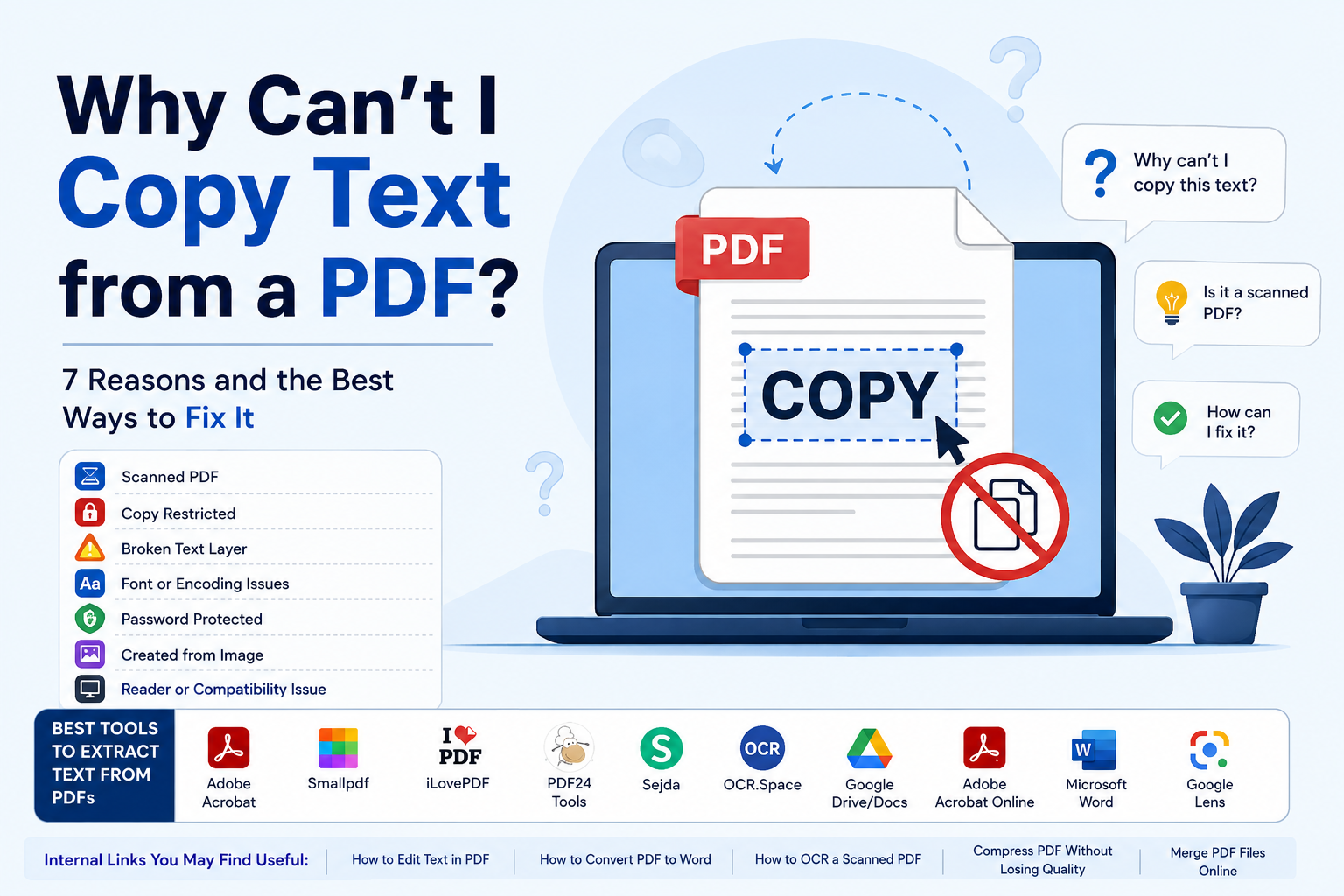
Here are the common causes
1. Your PDF Is Actually a Scanned Image
This is the thing I check when I have a problem with a PDF. Imagine someone takes a document and scans it into their computer. The scanner takes a picture of the page. Put that picture inside a PDF file.
- When I open the PDF everything looks like text but it is not.
-
When I try to highlight some words with my mouse I cannot do that.
That is because there is no text in the PDF, just a picture of the text.
How I can tell if a PDF is a scanned image
I usually see one or more of these things:
-
I cannot highlight words in the PDF.
-
The whole page acts like one picture.
-
When I use Ctrl+F to search for a word it does not find anything.
-
The words get blurry when I zoom in close.
-
When I try to copy some text it does not work.
-
The PDF came from a scanner or a camera.
The solution to this problem is usually something called OCR. OCR reads the picture. Make real text that I can search and copy. “how to OCR a scanned PDF”
2. Copying Has Been Restricted
Sometimes the PDF does have text that I can select but the person who made the PDF does not want me to copy it. The person who made the PDF can set security permissions to control what I can do with the file.
According to Adobe, the person who made the PDF can disable copying in the security settings. I can check the security settings in a PDF reader program.
For example in Adobe Acrobat I can look at the document properties. Check the Security section to see if I am allowed to copy the content. If I have the password I can remove the restriction using the right PDF software.
I should not think that the PDF is broken just because I cannot copy something. Sometimes the person who made the PDF wants to protect it so they restrict copying.
3. The PDF Has an Incorrect Text Layer
This one is a bit tricky. I can highlight the text in the PDF.
Sometimes the pasted text is missing spaces or has random symbols, incorrect characters or words in the wrong order.
The problem is probably because of how the fonts and character mappings were made inside the PDF. The PDF looks fine. The character information is not correct. This is why I can select text in the PDF. It becomes garbage when I paste it somewhere else.
The PDF has problems with text encoding and font mapping, which makes the text scrambled or unreadable. To fix this I might get results by changing the PDF to another format or using OCR on the affected pages.
4. The PDF Contains Special Fonts
Fonts can also cause problems. A PDF can have fonts that look fine but do not work well when I try to extract the text.
This happens a lot in documents made with publishing software, unusual character sets, decorative fonts or poorly made PDFs.
If only some parts of the PDF do not copy correctly I think the text encoding or font mapping is the problem, not the whole PDF being protected.
5. The PDF Was Created from a Photograph
A photograph of a document is an image.
If I take a picture of a receipt or a book page and save it as a PDF the words are not automatically turned into text. The PDF reader only sees the pixels.
That is where OCR comes in; it helps software understand those pixels, as letters and words.
But OCR is not perfect; it depends on the quality of the image. If the image is not clear or has fonts or is distorted it can be hard for the software to recognize the text.
Low quality scans, handwriting and backgrounds can also make it harder for the software to get it right.
6. The PDF Is. Password Protected
Another reason could be that it is protected. A PDF might need a password before some actions can be done. Depending on how the document's locked I might not be able to copy or get the information the usual way.
If I have the document or have permission to use it the best way is to use the password and the security features in the PDF software.
I should not think that password protection is something that can just be ignored. If the document is not mine the right thing to do is to ask for a version without restrictions or get approval from the person who owns it.
7. My PDF Reader May Be the Problem
Sometimes the PDF is okay.
The problem might be the program I am using to open it. I could be looking at the file inside a web browser, a PDF reader, a phone app or some other program that does not work well with the document.
Before trying anything I usually start with a simple check:
Open the PDF in a different trusted PDF reader.
- Try to select one sentence.
-
Try pressing Ctrl+C. Paste it into a plain-text editor.
-
Try pressing Ctrl+F to look for a word.
See if the same issue happens on every page. If copying works in another reader the PDF is probably not the issue.
How I Fix a PDF That Won't Let Me Copy Text
Once I know the reason the solution becomes much easier. If it is a scanned PDF I use OCR.“how to merge PDF files”
The OCR process creates a text layer over the scanned page. After processing I usually can. Copy the recognized text. If copying is restricted
I check the document's security settings. If I have the password or authorization I can unlock the document using PDF software. Adobe recommends using the password and security settings when working with protected PDFs.
If copied text is garbled. I try another PDF reader or conversion method.
If the text layer itself is unreliable OCR can sometimes produce a result because it reads the visible page instead of relying on the existing character mapping.
If OCR produces mistakes. I checked the document. OCR is not magic. It interprets an image. Can make mistakes. I pay attention to:
-
Names
-
Numbers
-
Dates
-
Addresses
-
Bank details
-
Tables
-
Mathematical symbols
-
Special characters
For important documents I always compare the OCR result, against the original page. “how to split a PDF”
My Advice Before Uploading a PDF to an Online Tool
I want to remind people of something that is easily forgotten.
A PDF can have personal and sensitive information in it.
This information could be things like
- Bank statements
-
Tax documents
-
Identity documents
-
Contracts
-
Medical records
-
Business information
-
Customer information
-
Passwords or account details
So before I upload a PDF to a service I always look at how they handle the documents I upload. “how to compress a PDF without losing quality”
I check what they say about storing and deleting these documents. I also see if they can process the documents on my computer.
For confidential documents I like to use a program on my computer that I trust. I use a tool that can process the document right on my computer if possible. It is nice to have things easy and fast. My privacy is more important when I am dealing with sensitive information. “how to protect a PDF with a password”
How to Improve OCR Accuracy
If the OCR is not working well I do not immediately think the problem is with the OCR software. The problem might be with the scan. I get results when the scan is very clear and the page is straight. The text should have contrast and the image should be of good quality. I also make sure to select the language and get rid of any extra noise in the background. The page should not have many fancy designs or decorations.
Adobe says that I should also pay attention to the quality of the scan and the language settings when the OCR is not working right. They also say to watch out for fonts and backgrounds. For documents I never think that the OCR is completely accurate. If one digit is wrong it can completely change a bank account number or an invoice amount or date or an identification number. “how to rearrange PDF pages”
This is why I always check the PDF carefully after it has been processed by the OCR. I make sure that all the information in the PDF is correct, the sensitive information, like bank account numbers and identification numbers. “difference between PDF and DOCX”
E-E-A-T: What I Should Know Before Trusting Extracted Text
When I use a tool to get text out of a PDF I do not just think about how the text appears. For results that I can really trust I think about four things.
Experience
I want a tool that can handle all kinds of PDFs. This includes scanned pages and forms and tables and pages that're not perfect.
Expertise
The tool should be good at understanding PDFs or using technology to get the text. It should not just grab any characters it can find.
Authoritativeness
For documents that're really important I like to use well known software and services. I want them to have instructions and a history that I can see.
Tustworthiness
I care about keeping my documents private and secure just like I care about getting the text right. I really want to know what happens to my document after I upload it to the tool.
This is why I think it is an idea to check important information against the original PDF. I do not just want to trust the extracted text without checking it. I want to make sure it is correct, by looking at the PDF.
Frequently Asked Questions
Why can I see text in a PDF but not select it?
The PDF may contain a scanned image instead of an actual text layer. OCR can convert the visible characters into selectable text.
Why does my copied PDF text look like random symbols?
The PDF may have a damaged or incorrectly mapped font or character encoding. Trying another extraction method or OCR can sometimes solve the problem.
Can I copy text from a scanned PDF?
Yes. You generally need OCR to recognize the text in the scanned image and create selectable text.
Why does Ctrl+C not work in my PDF?
The document may be image-based, protected by security settings, or affected by a problem with its text layer. Adobe confirms that PDF security settings can restrict copying.
Can I make a scanned PDF searchable?
Yes. OCR can create a searchable text layer over scanned pages.
Is OCR always accurate?
No. OCR can make mistakes, particularly with poor-quality scans, unusual fonts, handwriting, complex layouts, and difficult characters.
Why can I copy some words but not others?
The PDF may contain multiple types of content. Some pages or elements may contain real text while others are images or have problematic font mappings.
Can I copy text from a password-protected PDF?
If you have the appropriate password and authorization, you can use the PDF software's security controls to unlock permitted operations.
What is the easiest way to extract text from a PDF?
For a normal text-based PDF, simply selecting and copying the text may be enough. For a scanned PDF, I would use OCR.
Should I upload sensitive PDFs to an online OCR service?
I would be careful. Before uploading sensitive documents, I check the provider's privacy and retention policies. For highly confidential information, local processing is often the safer choice.
Conclusion
When I cannot copy text from a PDF I no longer think that something is wrong with my computer. The PDF itself is usually the reason. It might be a scanned image with no text layer It might have copying restrictions It could have a broken font mapping or corrupted text layer Or I might simply be using a PDF reader that is not handling the file properly
The way to troubleshoot the problem is to first try selecting a sentence and searching for a word If neither works I suspect the PDF is image-based and look toward OCR If the text selects but pastes incorrectly I investigate encoding or font problems If copying is explicitly restricted I check the documents security settings and make sure I have the necessary authorization
For most people the solution is surprisingly simple: identify what kind of PDF you have then use the tool designed for that specific problem. And when the document contains important or sensitive information I take one extra step I verify the extracted text, against the original and think about where the file is being processed .That small amount of caution can save me from a much bigger mistake later