Common PDF Editor Font Problems and Their Solutions
The complaint sounded trivial at first. A procurement officer opened a PDF that had been approved the previous afternoon. Everything looked fine on the creator's computer. The signatures were in place. The layout was clean. Deadlines had already been promised to three departments.
Then someone opened the same file on another machine. Half the document had shifted.
Headings wrapped into multiple lines. Tables expanded. A signature block jumped onto the next page. What had been a finalized document suddenly looked like a rough draft. I've seen versions of this problem more times than I can count. People assume PDFs are immune to formatting issues because the format was designed to preserve appearance. That's the marketing story. Reality tends to look different.
Most font problems in PDF editors start long before the PDF itself is created. The uncomfortable reality is that many users spend hours adjusting layouts while paying almost no attention to the fonts underneath.
- They notice spacing
- They notice colors
- They notice logos
- Fonts become an afterthought until something breaks
And when fonts break, they break everything around them.
The Font That Isn't Really There
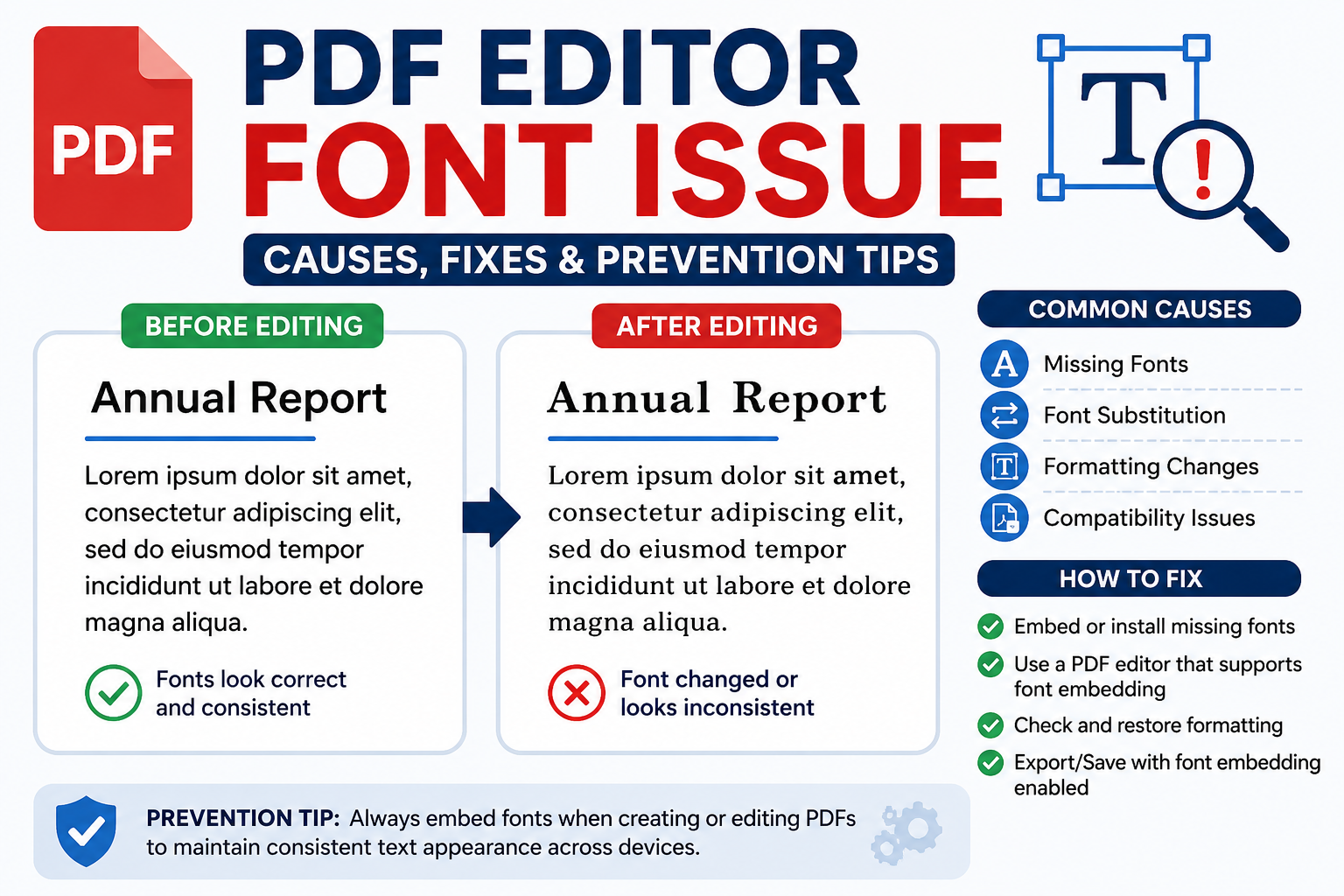
One of the most common issues involves missing embedded fonts. On paper, embedding sounds simple. The PDF stores font information so other computers can display the document correctly. What vendors rarely mention is that many workflows only partially embed fonts or exclude them altogether. The result is predictable. The receiving system can't find the original typeface. It substitutes another font. The PDF still opens. Nothing crashes. That's what makes the problem dangerous. People assume everything is fine. Then they notice a paragraph that suddenly requires an extra line.
A contract page becomes two pages. A government form exceeds its allowed boundaries. A carefully aligned invoice starts looking sloppy. I've reviewed enough projects to notice a pattern. Users rarely discover font substitution immediately. They discover it after submission. That's usually the expensive moment.
Why Some Fonts Refuse to Cooperate
Not every font wants to live inside a PDF. Months later, the exported PDF behaves differently. The irony is hard to ignore. The font looks available inside the editing software. Yet the PDF cannot legally or technically embed it correctly. Most users blame the PDF editor. The real issue often started with the font itself. Whenever I see unusual export behavior, font permissions are among the first things I check. They aren't the most obvious culprit.
When Text Suddenly Changes Size
Another complaint appears constantly.
My text got bigger
My spacing changed
My pages moved
The explanation usually involves font metrics. Different fonts may appear visually similar while occupying different physical dimensions. Even a tiny change in character width can ripple through an entire document. Think about warehouse shelving. Fonts behave the same way. One paragraph expands. Then another. Then page numbering shifts. Then signatures move. What started as a font issue becomes a document integrity issue. Procurement teams run into the same problem repeatedly because they focus on visible design rather than underlying font consistency.
The Strange Case of Missing Characters
This problem has become more visible as organizations operate globally. A PDF appears normal until someone enters a Tamil name, a Japanese address, or a specialized engineering symbol. Suddenly certain characters disappear.
- Sometimes they become empty boxes
- Sometimes question marks appear
- Sometimes entire words vanish
That sounds dramatic. I've watched support teams spend days troubleshooting software before discovering the document simply lacked proper Unicode font support. The technical explanation isn't complicated. The font doesn't contain the required character data. The practical consequences can be surprisingly serious. A missing character inside a marketing brochure is annoying. A missing character inside a legal record or government document creates entirely different problems.
Why Editing Existing PDFs Often Goes Wrong
Many users assume editing a PDF works like editing a Word document. It doesn't. That's where the story changes. A PDF stores visual instructions describing how content should appear. When an editor tries to modify existing text, it often needs access to the original font information. If that font isn't available, the editor starts making substitutions. The user changes one sentence. Everything looks normal at first glance. Then the modified section suddenly uses a slightly different typeface. One paragraph becomes darker. Another becomes narrower.
The inconsistency isn't always obvious until someone prints the document. Printing exposes mistakes mercilessly. I've seen organizations distribute thousands of pages before noticing that modified sections no longer matched the original design.
What Pixel Rendering Teaches Us About Font Problems
Fonts are not just letters. They're data. Imagine a stencil sprayed onto a wall. The edge isn't perfectly sharp because tiny droplets partially cover the boundary. Each character occupies a grid of pixels. Some pixels are fully filled. Others are partially filled to create smooth edges. That sounds technical. Most users never think about it until they zoom to 400 percent and wonder why text suddenly looks different.
Modern PDF editors handle these calculations differently depending on rendering engines, display scaling, operating systems, and font instructions. This matters more in 2026 than it did five years ago. Then a PDF enters the workflow. The document suddenly needs consistency.
Those creative imperfections that work beautifully in a browser become liabilities inside contracts, forms, manuals, and compliance documents. That's a contradiction many designers discover the hard way.
The Hidden Cost Nobody Budgets For
Most executives budget for software licenses. They budget for storage. They budget for cybersecurity. Font management rarely appears in the budget discussion. Yet I've seen organizations lose far more time troubleshooting font-related document failures than they ever spent evaluating software costs. One missing font can trigger support tickets, rework cycles, delayed approvals, compliance reviews, and frustrated clients. The cost isn't the font. The cost is everything that happens afterward. And that's where costs start climbing.
Solutions That Actually Work
The first solution sounds boring because it is. Use reliable, widely supported fonts whenever possible. Boring fonts create fewer surprises. The second solution matters even more. Check. Then check again. Then it suddenly feels reasonable. Finally, test PDFs on multiple devices before release. Not after release. Before. That small habit catches problems that expensive software often misses.
Conclusion
The PDF industry likes to present document portability as a solved problem. Yet every year I watch organizations discover that portability depends on dozens of small technical decisions hiding beneath the surface. The question isn't whether font problems will appear. The question is whether you'll discover them before your customers do.