The person receiving it needs a Word document.
That sounds routine until the PDF turns out to be a scanned image from 2017, filled with signatures, tables that don't align properly, and a company logo sitting on top of half the text.
I've seen enough document workflows to notice a pattern. Most users assume PDF-to-Word conversion is a simple format change. Click a button, wait a few seconds, download the result. Reality is much messier.
What users see is a conversion tool.
What the platform sees is a reconstruction problem.
The software isn't merely moving text from one container into another. It's trying to understand what existed before the PDF was created and then rebuild it in a completely different editing environment.
That distinction matters.
A PDF stores information differently than Word does. Word thinks in terms of paragraphs, headings, tables, styles, spacing, and editable content. A PDF often stores visual positioning. The document may look perfect on screen while hiding very little information about the author's original structure.
That's where the real engineering begins.
The First Layer: PDF Structure Analysis
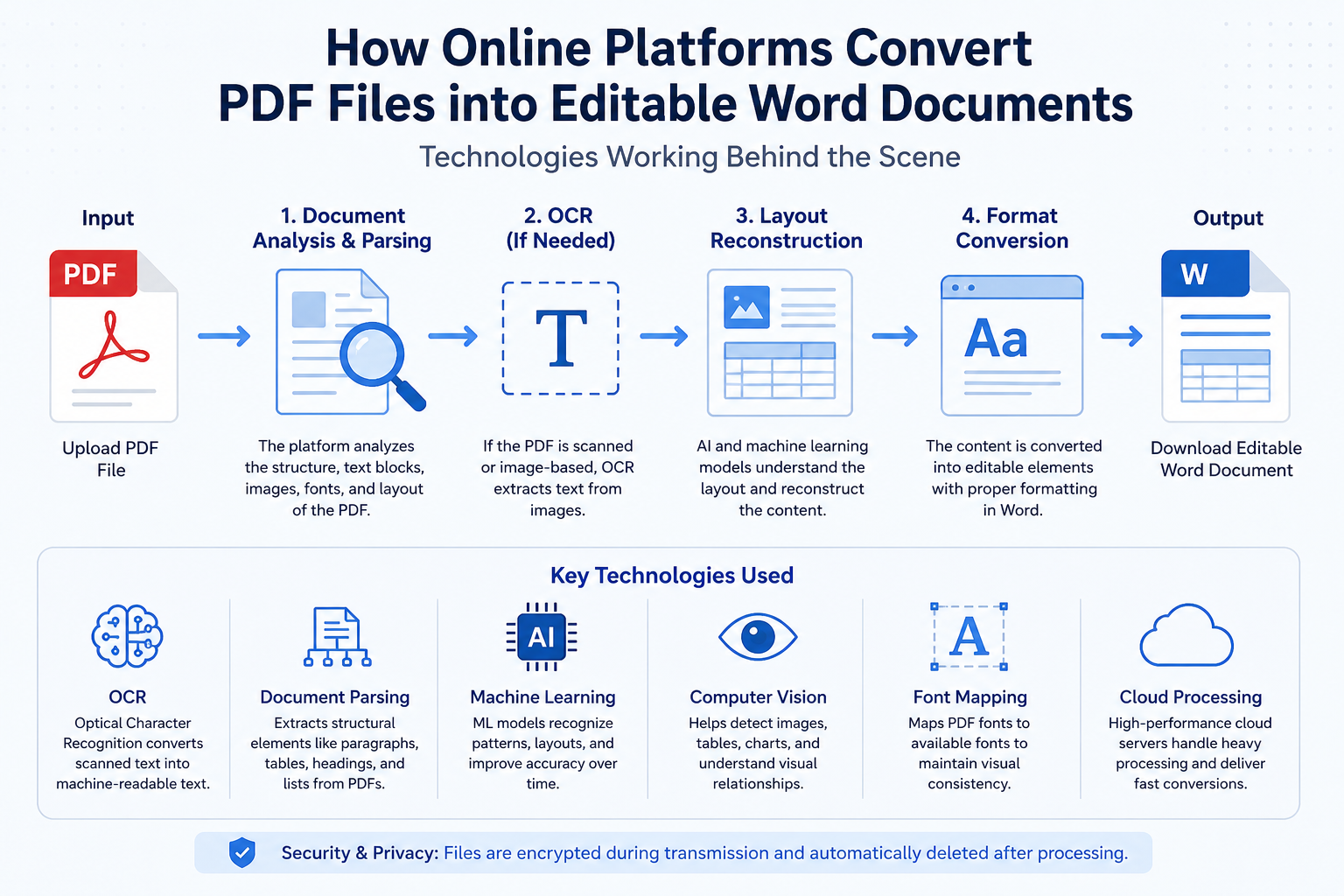
When a PDF reaches an online converter, the first technology involved is document structure parsing.
The platform starts dissecting the PDF internally.
On paper, this sounds straightforward.
Reality tends to look different.
Not all PDFs are created equally.
A PDF exported directly from Word is relatively cooperative. A PDF generated by accounting software behaves differently. A PDF created from a scanner often behaves like a completely different species.
I've reviewed enough document management projects to see organizations underestimate this distinction repeatedly.
They buy conversion tools expecting one workflow.
Half their archives turn out to be scanned images.
Everything changes.
OCR Is Usually Doing the Heavy Lifting
When the PDF contains scanned pages rather than actual text, platforms rely on Optical Character Recognition, commonly called OCR.
OCR attempts to identify characters from image data.
That explanation sounds simple.
The engineering behind it isn't.
Think of a page as a photograph of words rather than actual words.
The system must determine whether a shape represents an "O," a "0," or perhaps a poorly scanned "Q."
One blurry letter isn't a major issue.
Thousands of blurry letters become expensive.
This is why leading conversion platforms invest heavily in OCR engines.
The uncomfortable reality is that OCR accuracy often depends less on software quality and more on document quality.
Users blame the converter.
The original scan may be the real problem.
A photocopy of a photocopy of a photocopy creates challenges no algorithm fully solves.
Machine Learning Has Quietly Changed Conversion Accuracy
Ten years ago, many converters relied heavily on rule-based systems.
Those systems worked reasonably well.
Until they didn't.
A table slightly outside expected boundaries could confuse the entire reconstruction process.
Machine learning changed that.
Modern platforms train models to recognize document patterns.
Invoices.
Contracts.
Academic papers.
Government forms.
Financial statements.
Each follows recognizable layout behaviors.
Most people never notice this layer.
They simply observe that newer converters seem better than older ones.
The reason isn't magic.
The software has learned from enormous volumes of document examples.
I've spoken with teams building document automation systems, and one recurring observation appears everywhere: users care less about text accuracy than layout accuracy.
A missing comma may go unnoticed.
A broken contract table immediately triggers complaints.
Layout Reconstruction Is Often Harder Than OCR
Many users assume recognizing words is the difficult part.
Sometimes it isn't.
Rebuilding layout can be far more complicated.
A Word document needs to understand relationships.
What belongs inside a table?
Which line belongs to which paragraph?
Is that text a heading or simply larger text?
Should an image float or remain anchored?
This creates an incentive nobody talks about.
Conversion vendors often market OCR accuracy percentages because they're easier to advertise.
Layout reconstruction metrics are harder to explain.
They're also where many conversion failures occur.
The irony is hard to ignore.
A converter may achieve 99% text recognition while still producing a document that requires thirty minutes of manual cleanup.
Font Recognition Creates Unexpected Problems
Fonts introduce another challenge.
The PDF may contain embedded fonts unavailable on the conversion platform.
The platform then attempts substitution.
Sometimes the replacement works.
Sometimes a single font change causes line breaks throughout the document.
A paragraph that occupied half a page suddenly spills onto the next page.
Then the next page shifts.
Then the table moves.
Then the footer breaks.
One small substitution can create a chain reaction.
Procurement teams run into this issue repeatedly when evaluating enterprise document systems.
The demo files look perfect.
The real archives expose weaknesses.
Computer Vision Is Now Part of the Workflow
Many modern conversion platforms incorporate computer vision models.
These systems analyze visual relationships across a page.
Instead of reading only characters, they examine spatial organization.
Where are objects positioned?
Which elements belong together?
Which regions represent tables?
Which areas contain signatures?
That sounds reasonable.
Then the real-world complications appear.
Government forms frequently contain stamps, handwritten notes, overlapping marks, faded seals, and unusual layouts that were never part of the original template.
Suddenly the software isn't just reading documents.
It's interpreting visual evidence.
That's a very different challenge.
Tables Are Still the Industry's Headache
Ask engineers involved in document conversion what causes the most frustration.
Tables usually appear near the top.
Not always.
But often enough.
A table isn't just rows and columns.
It's relationships.
Merged cells.
Nested structures.
Hidden spacing.
Multi-page continuations.
What looks simple on paper often becomes expensive in practice.
I've seen organizations evaluate converters using clean marketing samples.
Then they upload procurement records, tax forms, logistics manifests, or healthcare documents.
The performance gap becomes obvious immediately.
This is where many vendor promises meet operational reality.
Cloud Infrastructure Makes Fast Conversion Possible
The file arrives.
Processing tasks are divided.
Recognition engines execute.
Layout reconstruction runs.
Quality validation occurs.
The result returns within seconds.
Most users interpret this as software efficiency.
Part of the speed actually comes from infrastructure investment.
Maintaining high-volume conversion systems isn't cheap.
Particularly when millions of files move through the platform every day.
And that's where costs start climbing.
Why Perfect Conversion Still Doesn't Exist
People occasionally ask why PDF-to-Word conversion isn't solved completely by now.
It's a fair question.
The answer usually disappoints them.
There isn't one PDF.
There are millions of PDFs created by thousands of applications across decades of software history.
Some contain text.
Some contain images.
Some contain both.
Some were generated correctly.
Some weren't.
Every conversion platform is attempting to reverse-engineer decisions made by unknown software, unknown users, under unknown conditions.
That's an extraordinarily difficult task.
The surprising part isn't that conversion sometimes fails.
The surprising part is that it works as often as it does.
The next major challenge won't be recognizing text more accurately. It will be teaching systems to understand document intent well enough that they can reconstruct not just what a page looked like, but what its creator originally meant when they built it.