Online PDF vs Offline PDF:
The Real Pros and Cons You Need to Know
A few months ago, I watched a small business owner miss a government filing deadline because a PDF wouldn't upload. The document looked perfectly fine on his screen. It opened without errors. Every page was readable. The portal rejected it anyway.
After nearly two hours of frustration, the problem turned out to be surprisingly simple. The PDF had been processed through an online tool that silently changed part of the document structure during compression. Nobody noticed until the upload failed. That's the kind of thing PDF discussions rarely mention.
Most conversations around online PDF tools versus offline PDF software focus on convenience, features, or pricing. Those factors matter. Still, after reviewing countless workflows, government submissions, corporate document processes, and everyday user complaints, I've noticed that the real differences usually emerge only when something goes wrong. And things do go wrong. Quite often, actually.
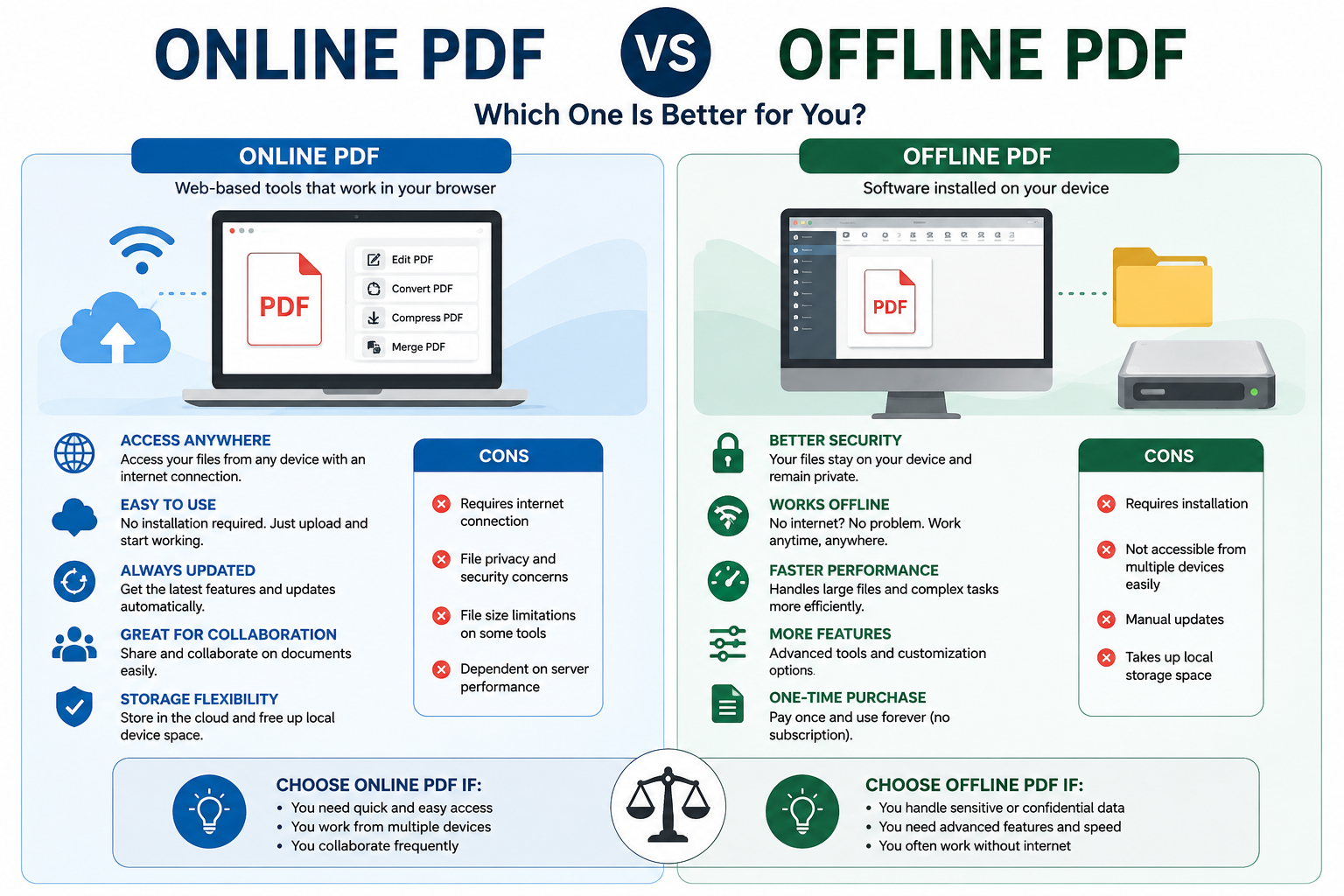
The marketing pitch for online PDF tools is easy to understand just,
1.Open a browser
2. Upload a file
3. Make your edits
4. Download the result
Here, you no need any https://oncepdf.com/edit-pdf
- Installation
- Updates
- Storage concerns
On paper, that sounds reasonable.
Reality tends to look different once documents become important
A student compressing lecture notes has different concerns than a company handling contracts. Someone merging family photographs into a PDF isn't thinking about compliance requirements, metadata retention, digital signatures, or document integrity. Procurement teams run into this distinction repeatedly.
Many organizations initially choose browser-based PDF services because they appear cheaper.
Then the real questions arrive
Where are uploaded files stored?
How long do they remain on servers?
I've reviewed enough projects to notice a pattern
Users assume online PDF platforms behave like temporary workspaces. Vendors often describe them that way too. Yet the actual infrastructure behind those services can involve,
- distributed storage systems,
- processing queues,
- temporary caching layers,
- analytics collection,
- third-party cloud providers.
Most users never think about any of that. Until legal departments start asking questions.
One healthcare organization I observed abandoned several browser-based PDF workflows after discovering their internal compliance review process required much deeper visibility into document handling procedures than the service provider was willing to disclose. The PDFs themselves weren't the problem. The process surrounding them was. That's where the story changes.
Offline PDF software
- Creates a completely different set of trade-offs. Files remain local.
- Processing remains local.
- Storage remains local, Sounds safer.
Sometimes it is. Sometimes it isn't.
I've seen organizations spend thousands on desktop PDF software while employees continued emailing unencrypted documents across departments. The software wasn't creating the risk. Human behavior was. People often assume offline equals secure. Security professionals usually laugh when they hear that.
A document sitting on an unpatched laptop isn't magically protected simply because it never touched a cloud server. What vendors rarely mention is that many document breaches originate from endpoint weaknesses rather than PDF applications themselves. That distinction matters. A lot. Then there's speed. This argument gets interesting because both sides claim victory.
Online PDF platforms benefit from powerful cloud infrastructure. Large files can sometimes process faster than older office computers. A heavily compressed engineering drawing might finish in seconds using remote servers.
1. Then the office internet slows down.
2. Then uploads stall.
3. Then downloads fail.
4. Then someone tries again.
5. The irony is hard to ignore.
I've watched teams waste twenty minutes waiting for a browser tool while an offline desktop application completed the same task in under two minutes because the local machine had enough processing power. Performance isn't determined by the tool category. It's determined by the weakest link in the workflow.
1. Sometimes that's the internet.
2. Sometimes that's the hardware.
3. Sometimes it's the user.
And yes, users absolutely matter.
What Actually Happens Behind the Screen
A PDF looks like a simple document. It isn't. Think of a PDF as a sealed shipping container rather than a sheet of paper. Inside that container are layers of information. Text objects. Images. Embedded fonts. Metadata. Security permissions. Form fields. Compression instructions. Rendering commands. Every PDF viewer has to interpret those instructions correctly. That's where complications begin.
A file that displays perfectly inside one browser-based editor may render differently inside another application because the software handles specific instructions differently.
I still encounter this issue with government forms. People assume PDFs are universal. Mostly they are. Perfectly universal? Not even close.
Tactile brutalism, layered interfaces, transparent UI elements, and high-fidelity visual compositions often rely on rendering accuracy. Slight differences in transparency calculations, image compression behavior, or font embedding can produce noticeably different results across PDF environments.
A designer may never see the issue. The client certainly will. And that usually triggers an uncomfortable email.
The Cost Nobody Calculates
Subscription fees get all the attention. They're rarely the biggest expense. Time is. I once watched an accounting department spend three days correcting formatting issues introduced during repeated PDF conversions. Nobody budgeted for those hours. Nobody included them in software evaluations.
1. The software itself was inexpensive.
2. The cleanup wasn't.
3. This creates an incentive nobody talks about.
Organizations often choose PDF solutions based on acquisition cost while ignoring operational friction. Small inconveniences repeated hundreds of times eventually become major expenses. One extra minute per document doesn't sound serious. Multiply it by ten thousand documents. Now we're discussing labor costs. That's a very different conversation.
The Strange Psychology Behind User Preferences
Here's something I've found fascinating. Many people choose online PDF tools because they trust the browser more than their own computer. Others do the exact opposite. Neither group is entirely rational. Trust often comes from familiarity rather than technical understanding.
Someone who spends all day inside cloud applications naturally gravitates toward browser-based solutions. Another person who has experienced internet outages prefers local software because they remember what happens when connectivity disappears.
Both perspectives contain truth. Both contain blind spots.
That's why blanket recommendations rarely work
1. Every workflow carries different risks.
2. Every organization tolerates different trade-offs.
3. Every user has different priorities.
And that's precisely why the online-versus-offline PDF debate never seems to end.
Where Things Are Heading
The line separating online and offline PDF tools is already becoming blurry.
Desktop applications increasingly connect to cloud services. Browser platforms are adding local processing capabilities. Hybrid workflows are quietly becoming the default model. Yet one tension remains unresolved.
Users want instant convenience without sacrificing
privacy
compatibility
reliability
performance or
control
Software vendors want to provide all of those things while maintaining profitable business models. Those goals don't always align.
Conclusion
The next few years won't be defined by who offers the most PDF features. They'll be defined by which platforms can convince users that convenience doesn't come with hidden compromises, because once trust becomes part of the document itself, losing it is far easier than rebuilding it.