PDF Translate Made Easy
How to Translate PDF Documents Without Losing Formatting
The email looked harmless until the translated version arrived. A manufacturing company had sent a 120-page product manual to an overseas distributor.
- The translation itself wasn't terrible
- The wording was understandable
- The problem was everything else
- Tables had shifted
- Images floated into random positions
- Technical diagrams no longer aligned with their labels
Several pages broke completely when opened on mobile devices The distributor wasn't angry about the translation. They were angry because the document looked unprofessional. I've seen this happen more times than most people realize. Whenever people talk about translating PDFs, they usually focus on language. In practice, language is often the easy part. Formatting is where projects quietly collapse.
A PDF is not a Word document wearing a different extension. That's the first misconception. Many users assume translation tools simply replace one language with another while keeping everything exactly where it was. On paper, that sounds reasonable. Reality tends to look different.
The moment text expands or contracts, layouts start reacting. Most people don't notice this until page thirty suddenly becomes page thirty-two.
That's where the story changes. The translation industry learned years ago that preserving formatting is often more valuable than translating quickly. A perfectly translated document that looks broken can create more damage than a slightly imperfect translation that maintains structure.
Procurement teams discover this during international tenders. Government departments discover it during multilingual service rollouts.
Legal teams discover it when contract numbering shifts unexpectedly. Nobody budgets for those problems at the beginning. They appear later.
Usually when deadlines are already tight.
Why PDF Formatting Breaks During Translation
The uncomfortable reality is that many PDFs were never designed to be translated. I've reviewed enough projects to notice a pattern. Documents created directly from professional publishing tools usually behave reasonably well. Documents assembled from screenshots, scanned pages, copied tables, mixed fonts, and embedded graphics become unpredictable very quickly. Think about a PDF like a completed jigsaw puzzle. The finished picture looks clean and organized.
What many people don't realize is that some translation systems must partially dismantle that puzzle before rebuilding it in another language. If pieces were loosely connected in the original file, the reconstruction process becomes messy. This is why two seemingly similar PDFs can produce completely different translation outcomes.
One works perfectly, The other becomes a disaster. The irony is hard to ignore
Organizations spend thousands creating beautifully designed reports and then use the cheapest possible translation workflow on documents intended for international audiences. The design team notices immediately. The purchasing department often notices later.
The Hidden Cost Nobody Talks About
Most discussions focus on translation accuracy percentages. That's not where large organizations lose money. They lose money fixing layouts.
A product catalog translated into six languages may require additional formatting reviews, visual inspections, font replacements, table corrections, image repositioning, and compliance checks. Suddenly a project that looked inexpensive becomes a surprisingly expensive publishing exercise. What vendors rarely mention is that translation and document reconstruction are often two different jobs.
The translation engine handles language. Someone still needs to verify the document behaves correctly afterward. I've watched companies save hundreds on translation software only to spend thousands correcting visual issues later. That math rarely appears in marketing brochures.
How Modern PDF Translation Tools Have Improved
To be fair, the situation is much better than it was a few years ago.
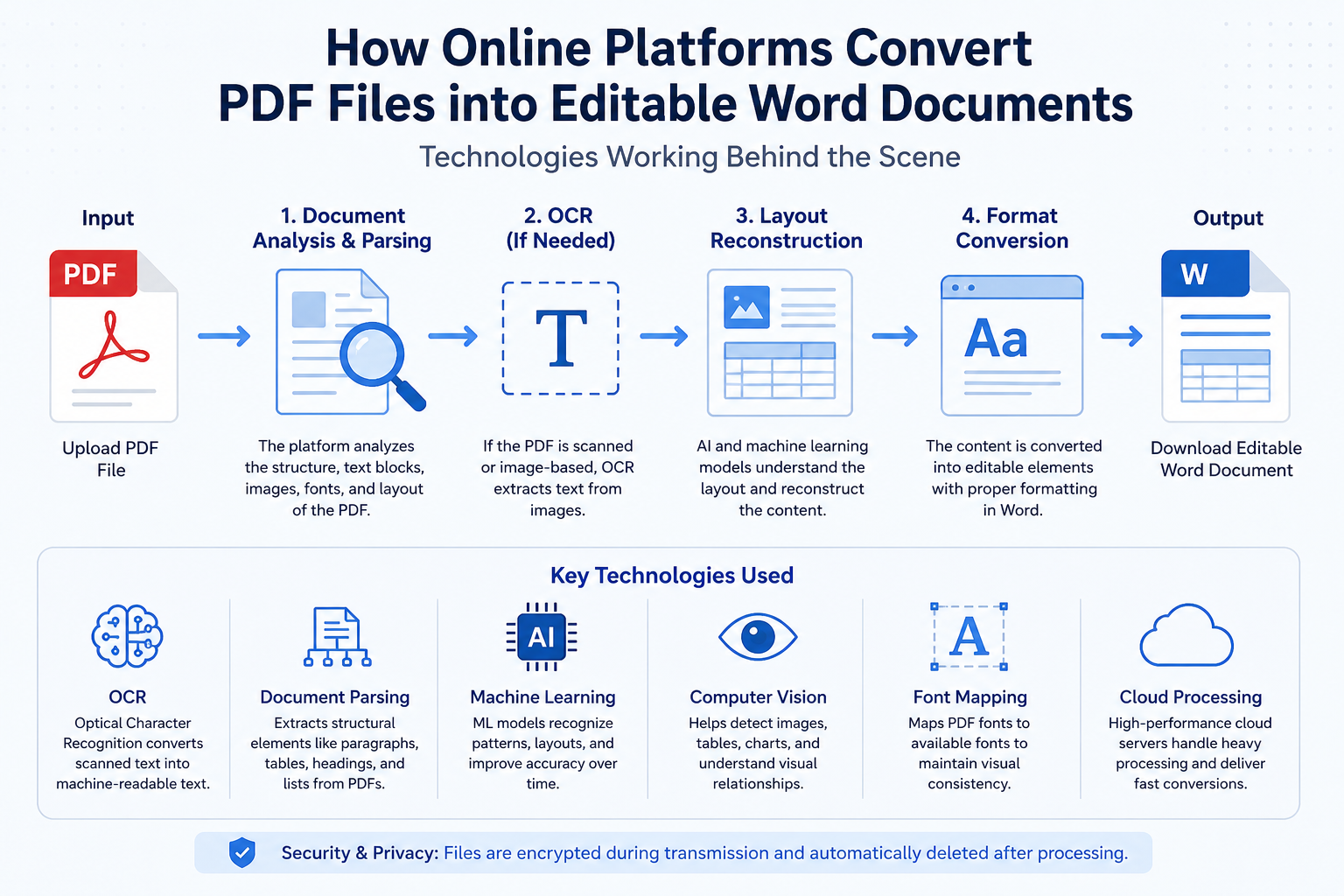
Translation platforms now use advanced document recognition systems that identify
- headings,
- tables,
- captions,
- charts, and
- structured content more intelligently than older tools ever could.
Yet technology hasn't completely solved the problem. Because documents themselves remain inconsistent. One PDF may contain editable text.
Another may contain scanned images pretending to be text. A third may combine both. That's where things become complicated.
Modern AI translation systems can recognize document structure remarkably well. They can detect columns, preserve section hierarchy, and maintain reading order across multiple languages. Then someone uploads a decade-old scanned contract. Everything changes. The software suddenly has to interpret image data, reconstruct text layers, estimate formatting intent, and then translate content afterward. Even the best systems occasionally struggle.
The Pixel Problem Most Users Never See
A scanned PDF behaves differently from a digitally created PDF. The difference is enormous. Imagine writing a sentence on paper and then taking a photograph of it. The words still exist visually. The computer doesn't actually understand them.
Each letter becomes a collection of tiny colored squares arranged in patterns. Anti-aliasing softens the edges. Transparency layers blend with surrounding backgrounds. Compression algorithms introduce subtle artifacts.
To a human reader, everything looks normal. To software, it's closer to solving a puzzle. This matters even more in 2026 design environments.
High-fidelity interfaces depend on extremely precise rendering. Modern e-commerce platforms increasingly use layered visual assets where translated text must coexist with product imagery and dynamic UI components. A translation error inside a simple paragraph is annoying.
A translation error inside a layered commercial asset can become expensive. That's why OCR quality remains one of the most overlooked factors in PDF translation workflows. Most users blame the translator. The real issue often started long before translation began.
What Actually Works in Practice
People constantly ask for the "best" PDF translation tool. I think that's the wrong question.
The better question is this:
What type of PDF are you translating?
A digitally generated business report behaves differently from a scanned government form. A technical engineering manual behaves differently from a marketing brochure. A legal contract behaves differently from a product catalog. Different documents require different workflows.
That's not exciting advice. It's usually accurate advice.
When formatting matters, I generally recommend reviewing the translated PDF page by page before distribution. That sounds obvious, yet many teams skip this step entirely. Then a customer finds the problem first. Customers are remarkably good quality-control inspectors when something goes wrong.
The Real Future of PDF Translation
Everyone talks about translation becoming instant. That part is already happening. The more interesting question involves document preservation. Formatting remains the battlefield. Because documents aren't just language containers. They're visual communication systems.
A translated sentence that shifts a regulatory disclaimer onto the wrong page can create legal risk. A misplaced table can create operational confusion. A broken technical diagram can trigger support tickets nobody anticipated. The challenge facing software vendors isn't translating words anymore. It's understanding the messy, inconsistent, unpredictable way humans build documents in the first place.
Conclusion
Judging by the PDFs still circulating inside many organizations today, that problem may prove harder than translation itself.