Top Reasons Words Appear Misaligned or Cut Off in PDF Documents
The complaint usually arrives five minutes before a deadline. Someone uploads a PDF to a government portal, opens the final version, and suddenly entire words have shifted. A signature line no longer aligns with the text above it. A few letters seem chopped off. The document looked perfect inside Word. It looked perfect during review. Then the PDF decided to tell a different story. I've seen this happen often enough that I no longer assume the PDF is the problem.
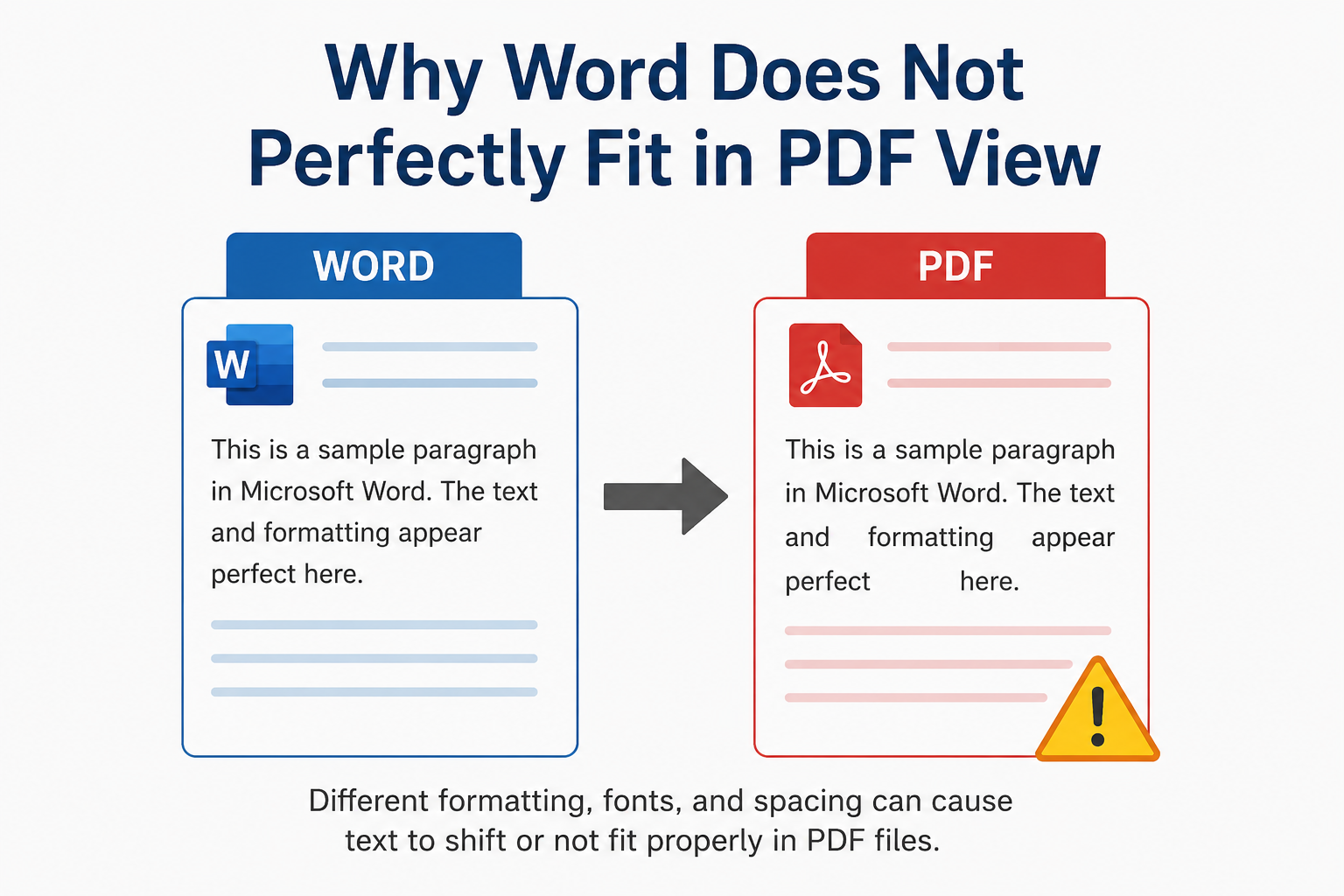
Most of the time, the PDF is simply exposing problems that were already hiding inside the original document. That sounds unfair. Yet after reviewing countless reports, tenders, invoices, technical submissions, compliance documents, and government application files, a pattern becomes obvious. What users interpret as a "broken PDF" is usually the result of font handling, rendering behavior, software differences, export settings, or document construction decisions made long before the PDF was created. The frustrating part is that the failure often appears random. It isn't.
The Font Nobody Thought About
A surprising number of PDF layout issues start with fonts. Not corrupted fonts. Not rare fonts. Ordinary fonts. Everything still looks fine at first glance. The trouble starts when character widths change by fractions of a pixel. One letter shifts slightly. A word wraps differently. A heading moves down a line. A table cell expands. Then dozens of tiny changes accumulate across multiple pages. By the time the PDF is generated, the layout resembles the original but isn't actually the same document anymore. What vendors rarely mention is that typography isn't just visual styling. Fonts contain spacing instructions, kerning information, character metrics, hinting data, and rendering behaviors that directly affect positioning. A PDF simply follows those instructions. When the instructions change, so does the layout.
Why Text Gets Cut Off Instead of Moving
Users often assume clipped text is a display bug. Sometimes it is. Usually it isn't. I've reviewed enough projects to notice that text clipping frequently appears when document containers have fixed dimensions. A text box might have been sized perfectly for one font version, one operating system, or one software release. Then somebody updates Office. Or switches computers. Or exports through a different PDF engine. Suddenly the text occupies slightly more vertical space than before. The container doesn't grow.
The text gets sacrificed. A single character disappears. Then a word. Then half a sentence. The irony is hard to ignore. Organizations spend weeks reviewing document content while completely overlooking the invisible formatting rules controlling how that content is displayed.
The Hidden Cost of Software Differences
On paper, PDF is supposed to solve compatibility problems. Reality tends to look different. The document may be created in Microsoft Word, converted using Adobe Acrobat, reviewed inside a browser, downloaded onto a mobile device, then opened using a third-party PDF reader. Each stage introduces another rendering environment. Each environment interprets information slightly differently. The differences are often tiny. Tiny differences create large problems. Procurement teams run into the same issue repeatedly when multiple vendors contribute documentation to a single project. Everyone follows the same template. Everyone submits a PDF. Yet page counts differ. Tables shift. Paragraph spacing changes. Nobody understands why. The explanation is usually hidden inside software versions, export engines, embedded font behavior, or rendering algorithms. Not inside the document itself.
Pixels, Edges, and Why Letters Sometimes Look Wrong
Think about a printed sign viewed through a window screen. You can still read it. You can still recognize the shapes. But some edges appear softer because parts of the screen partially block your view. That's surprisingly close to how modern rendering works. Text on a screen isn't composed of perfect curves. Every letter must eventually fit inside a grid of pixels. The rendering engine decides how much of each pixel should represent the letter shape. The character remains technically correct. Visually, it shifts. That tiny shift can affect spacing calculations, line wrapping behavior, and alignment precision.
High-fidelity UI systems, tactile brutalism, ultra-precise interface layouts, and layered 3D commerce experiences all rely on pixel-level consistency. Small rendering variations that once went unnoticed suddenly become obvious because today's interfaces leave less room for visual error.
Embedded Fonts Are Not Optional
Many users discover embedded fonts only after something breaks. That's backwards. Embedded fonts should be part of the planning process. When a font is embedded, the PDF carries the required font information inside the file itself. The receiving device doesn't need to guess. Yet organizations still disable embedding because they want slightly smaller file sizes.
I've watched teams spend hours troubleshooting layout issues to save a few hundred kilobytes. That's not optimization. That's creating future work.
Government Portals Make Everything Worse
Anyone who regularly uploads documents to government systems already knows this. The portal isn't always your friend. Many portals compress files automatically. Some rebuild uploaded PDFs. Others perform validation processes that alter document structures during submission. The document you uploaded isn't necessarily the document being displayed afterward. Most executives discover this too late. It's simply processing it according to its own rules. Unfortunately, those rules are rarely explained.
The Problem Nobody Checks
1. People inspect fonts
2. People inspect margins
3. People inspect export settings
Few people inspect line spacing calculations.
That's a mistake. Line height inconsistencies quietly cause some of the strangest PDF behavior I've seen. A document may appear perfect on one machine and slightly compressed on another because the rendering engine calculates vertical spacing differently. Nothing appears broken. Until text starts overlapping. Or clipping. Or disappearing. This creates an incentive nobody talks about. They adjust layouts manually instead of fixing the underlying formatting architecture.
The document survives today. Tomorrow becomes somebody else's problem.
Why PDF Problems Are Becoming More Common
The uncomfortable reality is that document ecosystems are becoming more fragmented. Cloud editors. Desktop editors. Browser-based viewers. Mobile viewers. AI-powered document tools. Automated conversion platforms. Compression services. Digital signature platforms. Every new step introduces another opportunity for rendering variation. Ironically, documents are easier to share than ever before. They're harder to control. The industry still treats PDF as a final destination. In practice, PDFs now travel through complex chains of software, validation systems, security scanners, workflow engines, and cloud platforms before reaching the end user.
Each stage can influence how text is displayed. Most users never see that journey. They only notice the result when a word suddenly shifts out of place or disappears entirely.