What Is OCR in PDF Files and How Does It Actually Work?
The complaint sounded familiar. A government contractor had scanned nearly 18,000 pages of records into PDF format. The files opened perfectly. Every page looked clean. The project manager thought the job was finished. Then somebody tried searching for a citizen's name. Nothing appeared. The PDF contained thousands of pages, yet the computer couldn't find a single word. I've seen versions of this problem for years. Not because people don't understand PDFs. Most people do. The issue is that many users assume a scanned PDF already contains searchable text. It usually doesn't. What they are looking at is often just a collection of photographs trapped inside a PDF container. And that's where OCR enters the story.
The Part Most People Never See
When somebody scans a paper document, the scanner isn't reading words. It's capturing pixels. That's an important distinction. Think about taking a picture of a newspaper with your phone. You can see the article. I can see the article. The phone cannot read the article. As far as the device is concerned, it's just an image. OCR, short for Optical Character Recognition, exists to bridge that gap. The software studies those pixel patterns and attempts to identify letters, numbers, punctuation marks, and symbols hidden inside the image. Simple idea. Messy reality. People often imagine OCR as a magical "convert image to text" button. What vendors rarely mention is how much interpretation is happening underneath. The software is constantly making educated guesses. Sometimes very good guesses. Sometimes terrible ones.
Why OCR Mistakes Happen
A clean black "O" and the number "0" can look almost identical.
The same problem appears with "I", "l", and "1". Poor scans make everything worse. Someone folds a page. A scanner introduces shadows. A fax machine adds noise. A clerk scans at the wrong resolution. Months later the OCR engine gets blamed. That sounds unfair until you've watched it happen repeatedly. On paper, OCR appears straightforward. Reality tends to look different. A legal archive might contain documents generated across forty years using different typewriters, printers, photocopiers, and scanners. The software has to make sense of all of them. Some pages practically fight back. https://oncepdf.com/ocr-pdf
What OCR Is Actually Doing
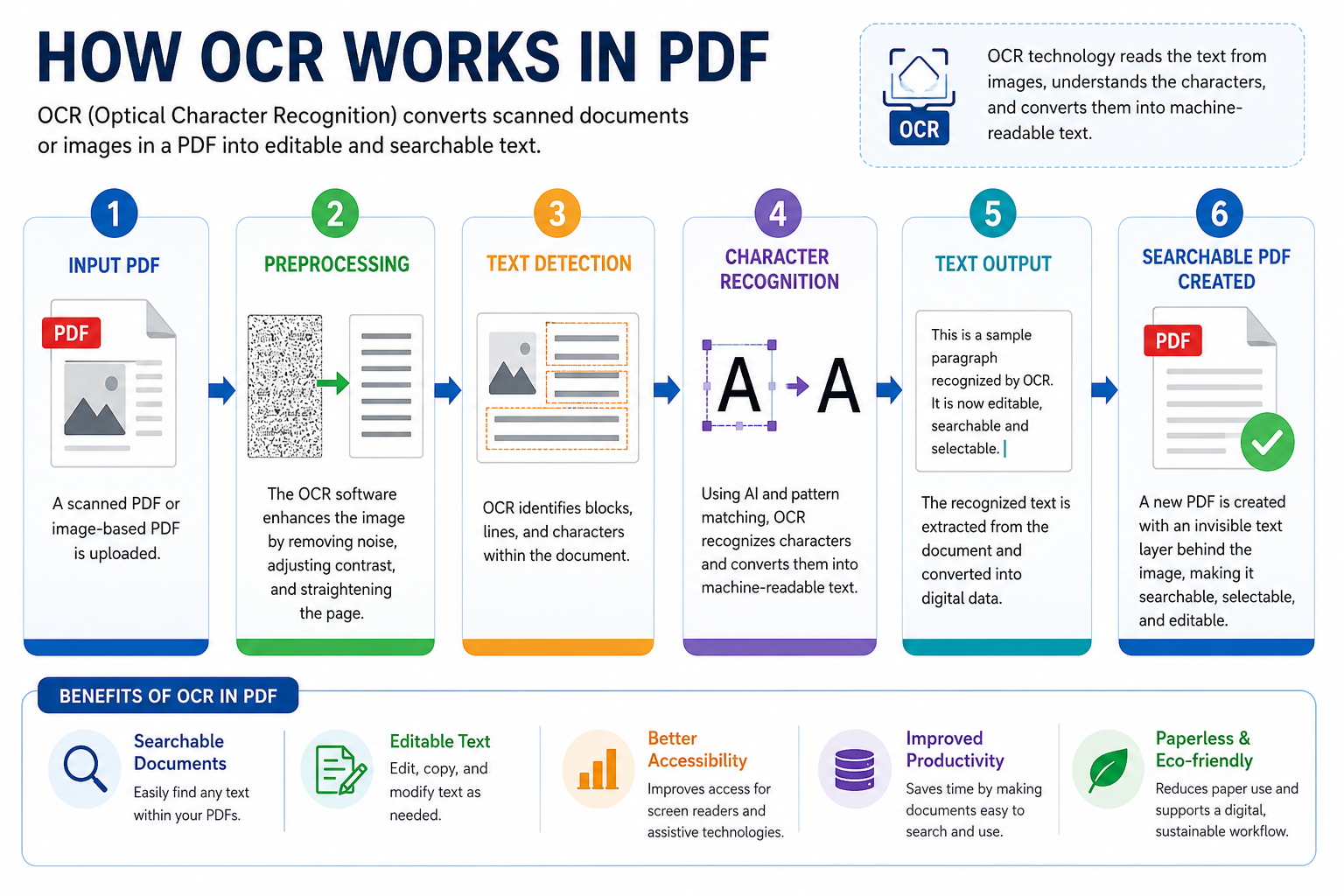
Underneath the hood, OCR software follows several stages. Not always in the same order, and not always using the same methods, but the general process remains surprisingly consistent. First, the image gets cleaned. The software removes speckles, background noise, scanner artifacts, and unnecessary marks. Then it tries to locate text regions. This sounds simple until you remember that documents contain logos, signatures, stamps, tables, handwritten notes, seals, photographs, watermarks, and random marks left by humans over decades. I've watched systems confidently identify coffee stains as characters. That wasn't an impressive demonstration. Next comes character segmentation. Imagine cutting individual puzzle pieces out of a photograph before trying to identify each piece. That's roughly what's happening.
Only after that stage does character recognition begin. The difference is substantial. Older engines often struggled when fonts changed unexpectedly. Modern systems adapt far better, although they still make mistakes when documents become chaotic. And trust me, document collections become chaotic far more often than software brochures suggest.
Why Searchable PDFs Matter More Than Most People Realize
Many users think OCR exists primarily for convenience.
Search
Copy
Paste
Done
That's only part of the story. The uncomfortable reality is that entire business processes depend on searchable documents. Consider a hospital archive. A single patient record may contain hundreds of pages spread across years. Without OCR, staff members manually open and inspect documents one page at a time. With OCR, a search can locate critical information within seconds. The difference isn't just efficiency. It's operational survival. The same pattern appears inside law firms, insurance companies, banks, universities, and government departments.
Procurement teams run into the same problem repeatedly. They approve large-scale digitization projects, then discover nobody planned for document retrieval. Scanning documents is easy. Finding information later is the expensive part.
Pixels, Layers, and the Hidden Text Nobody Notices
Here's the detail most users never discover. A properly OCR-processed PDF usually contains two layers. The visible layer is the scanned image. The hidden layer contains recognized text. When you search a word inside the PDF, you're not searching the image. You're searching that invisible text layer. Think of it like tracing paper placed behind a photograph. You still see the original page. The software sees structured text hidden underneath. That's why OCR-generated PDFs often look identical before and after processing. The visual appearance barely changes. The intelligence inside the file changes dramatically. Many people expect visible transformations. Instead, the biggest change happens where nobody can see it.
Why Modern Designers and Developers Care About OCR
OCR has quietly become part of broader digital experiences. That surprises some people. Designers may intentionally preserve visual imperfections while depending on sophisticated text recognition systems operating behind the scenes. E-commerce platforms are beginning to use OCR within layered 3D product experiences as well. A scanned warranty card becomes searchable. A photographed instruction manual becomes indexable. The user never sees the OCR engine working. They only notice when search suddenly works. Or when it doesn't.
The Part Vendors Rarely Talk About
Accuracy percentages can be misleading. A vendor might advertise 99% OCR accuracy. Sounds excellent. Until you're processing one million characters. That remaining 1% suddenly represents thousands of potential errors. Most executives discover this too late. A single misread invoice number can trigger accounting problems. A single incorrectly recognized legal clause can create review delays. A single mistaken medical record entry can require manual verification. OCR isn't simply about recognizing text. It's about determining how much error an organization can tolerate. That's a very different conversation. And that's where costs start climbing. Human review teams appear. Quality assurance processes appear. Exception handling appears. The software may automate ninety percent of the work. The remaining ten percent often consumes a disproportionate amount of attention.
Where OCR Is Heading Next
The interesting question isn't whether OCR works. It clearly does. The more difficult question is whether future systems will stop treating documents as images altogether and begin understanding them as structured knowledge. We're already seeing signs of that shift. Recognizing a word is one challenge.
Conclusion
Understanding that the word represents a customer ID, an invoice amount, a court case number, or a prescription instruction is another challenge entirely. The gap between recognition and understanding remains one of the most expensive problems in document management. And if history is any guide, the organizations that underestimate that gap today will probably be explaining it to auditors tomorrow.