Why PDFs Crash: The Most Common Causes Behind PDF Failures
A procurement manager couldn't open a PDF containing a government tender document. The file had downloaded successfully. The size looked normal. Nothing appeared unusual. Yet every attempt to open it resulted in an application crash. The immediate assumption was predictable. Most people blamed the PDF reader. I've watched this scenario play out countless times over the years, and the PDF reader is often the last thing causing the problem. That's what makes PDF failures so frustrating. PDFs have a reputation for being stable. They are supposed to be the "final version" of a document. Once created, the expectation is simple: send it anywhere and it should work. Most of the time that's exactly what happens. Then the exceptions show up. And those exceptions tend to appear at the worst possible moments. A government submission deadline. A legal filing. A financial audit. A product catalog about to be printed. Nobody worries about PDFs until one refuses to open. The irony is that PDF itself isn't a simple format anymore.
Many people still imagine PDFs as digital paper. That description stopped being accurate years ago. Modern PDF files often contain embedded fonts, compressed images, transparency layers, digital signatures, JavaScript actions, interactive forms, metadata structures, encryption rules, accessibility tags, rendering instructions, and cross-reference tables all packed into a single file. On paper, that sounds manageable. Reality tends to look different. I've reviewed enough failed PDF workflows to notice a pattern. Most crashes occur when complexity quietly accumulates inside documents that users believe are simple. A twenty-page report might actually contain hundreds of separate rendering instructions. Nobody sees that part.
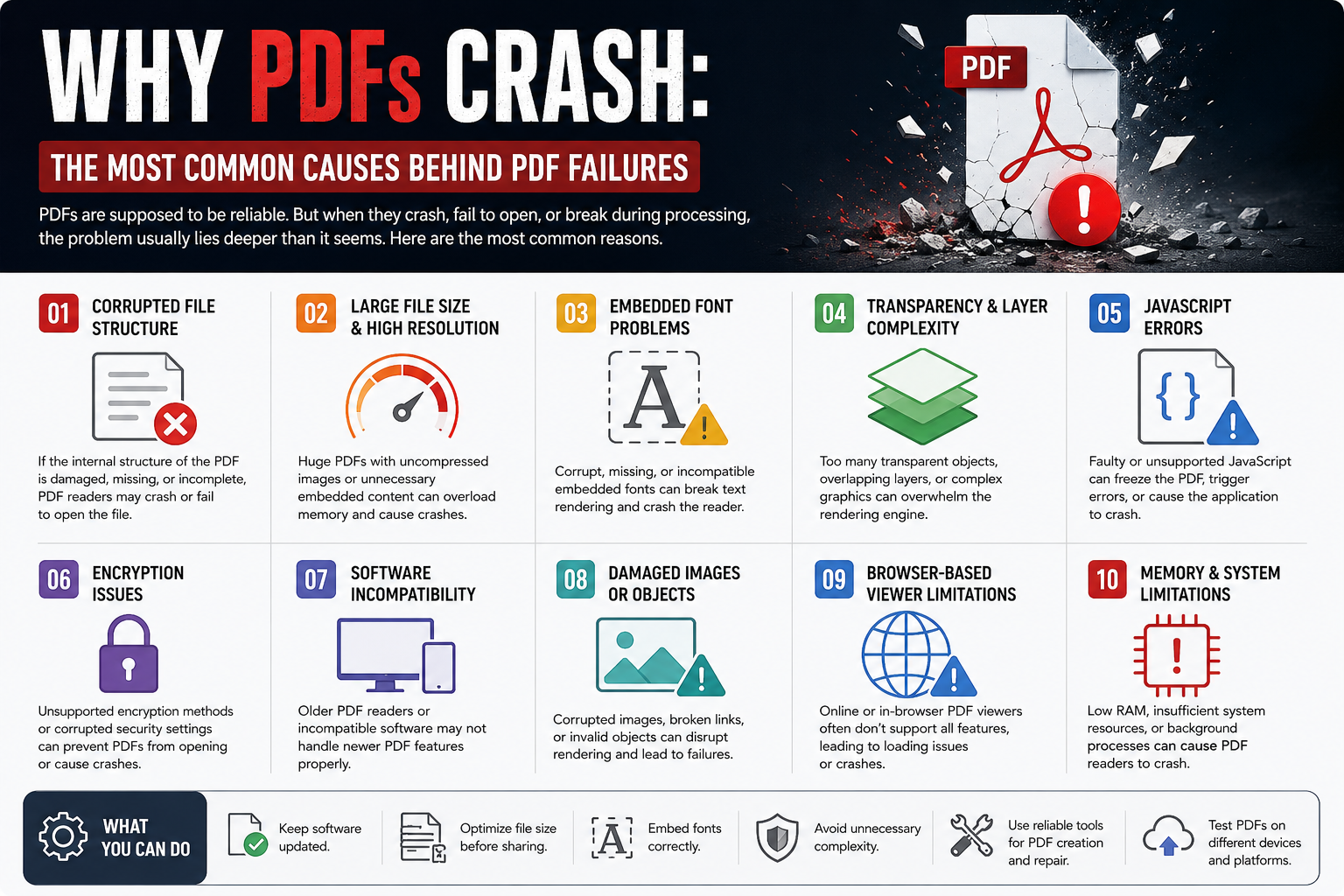
One of the most common causes involves damaged internal structure. Think of a PDF as a book with a detailed table of contents. Every page, image, object, and font has a location reference. When those references become corrupted, the reader starts looking for information that no longer exists where it expects it to be. The result isn't always an error message. Sometimes the application simply disappears. Users often describe it as a random crash. Engineers usually discover a broken object reference buried deep inside the document. What makes this particularly annoying is that the visible pages may appear completely normal. The file looks healthy. It isn't. Another issue appears when PDFs become image warehouses disguised as documents.
I've seen five-page PDFs exceed 300 MB because someone exported every page as a full-resolution image. The document technically works, but opening it requires significant memory allocation. Older machines struggle first. Then mobile devices start failing. Then browser-based PDF viewers begin freezing. Most executives discover this too late, usually after customers complain. A surprising number of PDF crashes originate from fonts. Not missing fonts. Broken fonts. There is a difference.
PDF creators frequently embed fonts to preserve appearance across devices. That's generally a good practice. Problems emerge when embedded font files contain corrupted glyph data or incompatible character definitions.
The document may render perfectly on one machine. Another machine crashes instantly. That inconsistency creates endless confusion because nobody can reproduce the issue consistently. Support teams hate these cases. The pixel mechanics behind PDFs introduce another layer of complexity. Imagine painting a sign using thousands of tiny colored glass tiles. Every tile represents pixel information. Some tiles are fully visible. That's essentially how alpha transparency behaves inside many PDF rendering engines. A single transparency layer isn't usually a problem. Stack hundreds of overlapping transparent objects, shadows, masks, clipped paths, and anti-aliased edges together, and rendering becomes significantly heavier. Designers rarely notice because modern workstations handle it comfortably. Then someone opens the file on a low-memory tablet.
Suddenly everything changes. High-fidelity interface mockups frequently rely on layered transparency effects. Three-dimensional e-commerce catalogs routinely stack multiple rendering layers into interactive presentations. The visual result can look fantastic. The underlying PDF may become surprisingly fragile. What vendors rarely mention is how much rendering work happens behind the scenes. Every transparency calculation requires processing. Every layer increases complexity. Every optimization shortcut eventually reaches a limit. Then there is JavaScript.
Most users don't even realize PDFs can contain executable scripts. Interactive forms, validation checks, automated calculations, and workflow functions often depend on embedded JavaScript. The feature sounds useful. Sometimes it is. The uncomfortable reality is that poorly written scripts can freeze readers, trigger compatibility problems, or cause outright crashes. Security restrictions make things even messier. One PDF viewer may allow a script. Another blocks it completely. A third partially executes it and fails halfway through. Predictability disappears. Encryption introduces another source of failure. People assume encryption only protects documents. In practice, encryption also introduces additional processing requirements and compatibility considerations.
A document encrypted with newer standards may not behave properly inside older software environments. Users rarely know which encryption version they're dealing with. They only know the file won't open. And that's where support calls begin.
Procurement teams run into the same problem repeatedly when exchanging documents across multiple organizations. One department upgrades software. Another delays updates. A third relies on browser viewers instead of desktop applications. The PDF becomes the meeting point for incompatible systems. Nobody planned for that. Everyone pays for it. Cloud workflows have introduced a different category of failures.
Many PDFs today are opened through browser-based rendering engines rather than traditional desktop readers. Browser viewers prioritize speed and convenience. They don't always implement every PDF specification feature. That trade-off remains largely invisible until a complex file appears. Then the real problem shows up. The PDF technically follows the specification. The viewer technically supports PDFs. The two simply don't agree on what "support" means. I've seen organizations spend days investigating what turned out to be a browser rendering limitation.
Not corruption
Not malware
Not user error
Conclusion
Just interpretation differences. That's becoming more common. The difficult question isn't whether PDFs will continue dominating document exchange. They almost certainly will. The real question is whether document complexity is growing faster than the average organization's ability to manage it. Every year designers add more layers, businesses add more automation, compliance teams add more requirements, and software vendors add more features. PDFs keep absorbing all of it. At some point, the industry's biggest challenge may not be creating richer documents.
It may be deciding how much complexity a "simple document" should be allowed to carry before reliability starts breaking apart.